Saturday, September 6, 2014

Crowdsourced Malware Triage


This content has moved to http://www.openanalysis.net/#training


This is the long annotated version of a short presentation I put together outlining the the crowdsource tools I have used in the past for malware triage.

Not to be confused with malware reverse engineering, malware triage is a function of an enterprise Incident Response program (or in a large enterprise a SOC). The purpose of malware triage is to gain a quick broad understanding of what type of exposure your organization has when dealing with a new threat.

In an enterprise environment you may fined yourself in a situation where you need to perform a malware triage but you simply don't have access to the tools you need (sometimes this the result of your GRC approvals lagging behind technology or you may simply be in the early stages of building your Incident Response program).

In these situations you will need to rely on online tools. You can perform most malware triage simply by using a notepad, web browser, and the internet.

Pro tip: Instead of using notepad.exe try using OneNote http://www.onenote.com/ or EverNote https://evernote.com/ and keep all of your notes from past triages. This will provide a central repository that you can search and use to provide insight into future malware .triage  

 The crowdsource tools we will look at are a mix of tools specifically aimed at Incident Responders (such as crowdsource intelligence offerings) and tools that are just useful during the triage process if we don't have a local equivalent handy.

It should be noted that even with a completely vanilla Windows 7 install and application whitelisting many of these tools can be created locally through the use of PowerShell. However, for the sake of this presentation we will try to accomplish all analysis with online tools.

Obviously by their very nature these tools do not support strong operational security practices! If you are trying to avoid tipping off an adversary that you are investigating them, don't use these tools.

Pro tip: If you don't have the local tools/lab you need and you are trying to analyze an APT you have already lost. This presentation is not for you.

The scenario we will use as our demo involves receiving an e-mail with a suspicious link in it. We want to triage that URL.

Pro tip: you will note that in the screen shot it appears as though we are drafting the suspicious e-mail not receiving it... maybe we are... maybe I was tired when I took the screen shot... maybe we should move on...

 The triage workflow that we will be using to analyze the URL.

During the passive analysis phase we try to gather information about the URL without actually interacting with it. This is one of the areas that tools specific for Incident Responders have really improved in the past few years. There are tons of tools available, I've just listed the ones I use daily.  

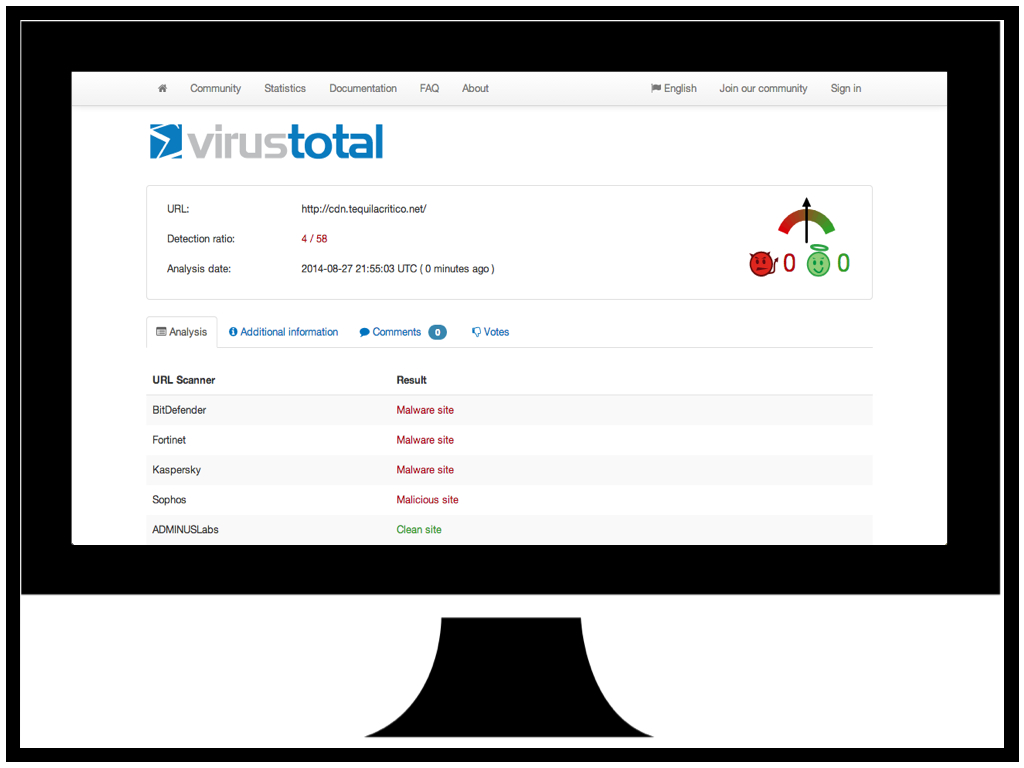
We are all familiar with https://www.virustotal.com/ so not much needs to be said here.

The URL we are triaging certainly looks malicious...

BlueCoat offer this great service https://sitereview.bluecoat.com/sitereview.jsp that will provide a "classification" for a domain you are interested in. In addition to classifying malicious domains they will also provide information on domains that are serving potentially unwanted software and adware.

Again BlueCoat confirms that the domain for the URL we are triaging appears to be malicious.

The https://www.passivetotal.org site is resource that allows researchers and other incident responders to "tag" domains with information such as the malware family they are associated with.

In this case the URL we are triaging has been tagged as "Crime" for crimeware and "Sweet Orange" possibly indicating that it leads to the Sweet Orange Exploit Kit.

The https://www.domaintools.com/ site has a suite of tools that can be used to identify the owners of domains, or group similar domains. This is a good place to start if you suspect a website has been compromised and you want to notify the owner.

In our case our URL doesn't have too much useful information but we can see that it is hosed on a shared hosting site. Possibly something to note for followup later.

Once we have gathered all the information we can from passive analysis it is time to interact with the URL.

Since we won't be using any local tools other than a web browser we will need some online tools to help us download and save a copy of the URL.

Since we won't be directly interacting with the URL using our web browser we will want to profile the user agent string so we can mirror it with our tools. Many exploit kits will deploy specific exploits based on the user agent string (and other browser features) so it is best to mimic the environment you are trying to protect. http://www.useragentstring.com/index.php is a great tool to determine what your user agent is.

 Now that we are ready to interact with the URL we want to download a copy of the page with our first interaction. Many exploit kits have a "request limit" and will stop responding after 2 or 3 requests. This is to protect the EK from people like us : )

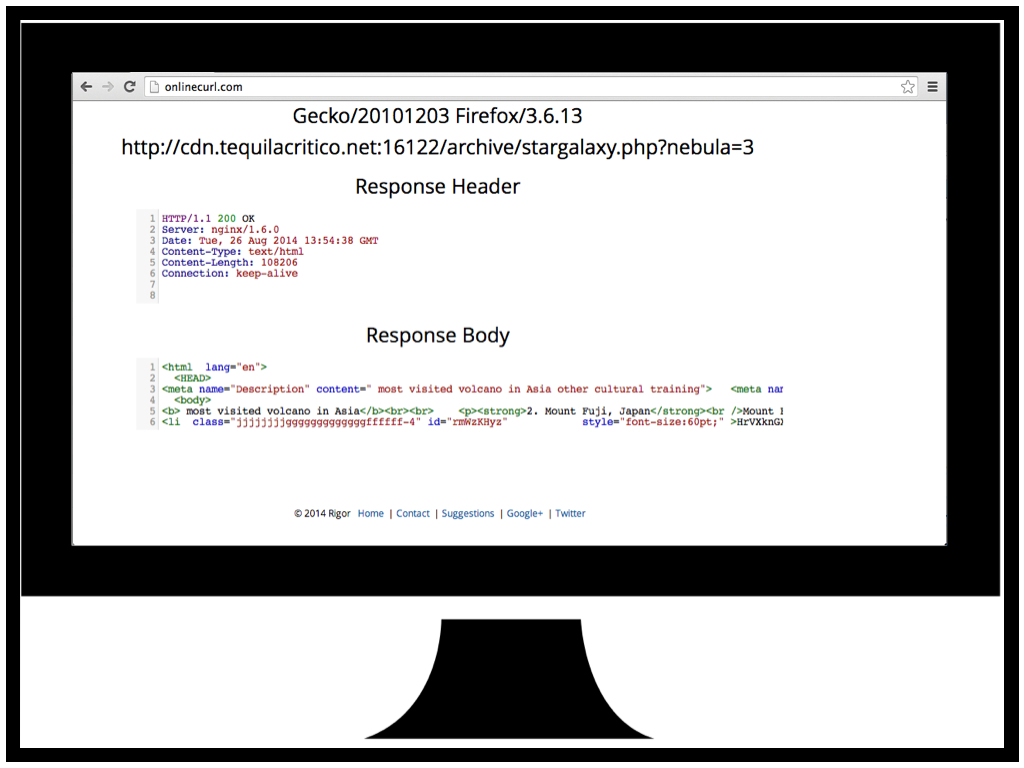
For this task we use http://onlinecurl.com/ an online version of the CURL tool everyone is familiar with. The online version has all the features of the cli version and supports options such as a custom user agent string.

We request our triage URL and we now we have a copy of the HTML code to analyze (more on this in a minute).

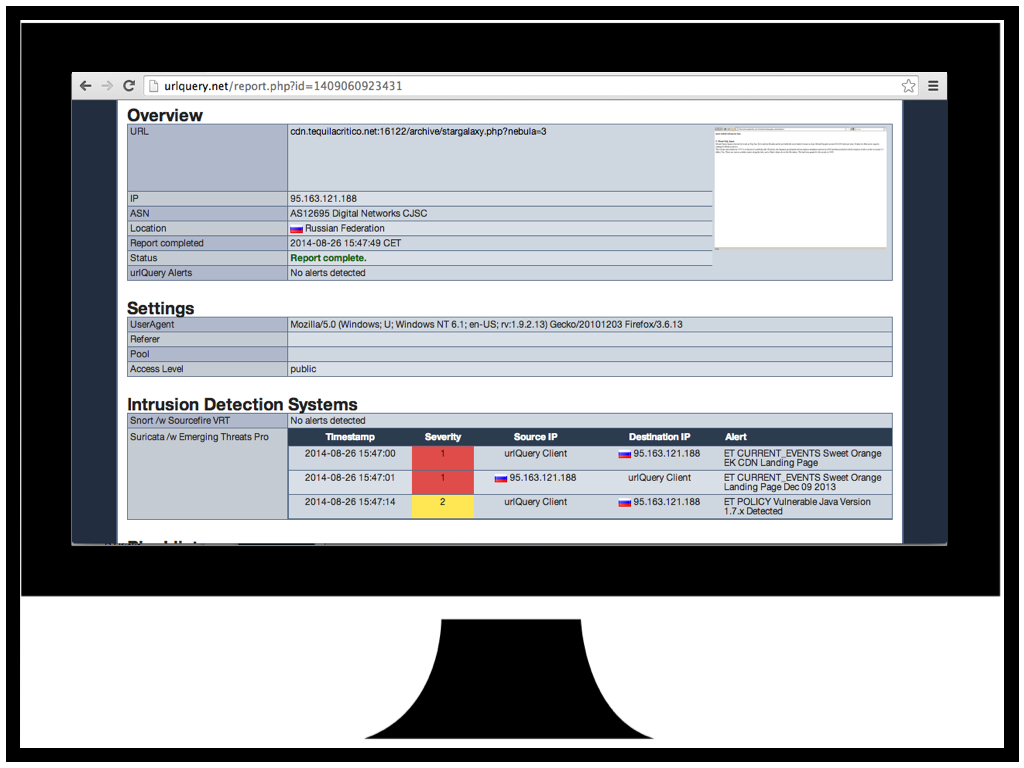
Now that we have a copy of the page and aren't worried about hitting the request limit we can try to analyze the URL with http://urlquery.net/. URLQuery is a browser sandbox that will retrieve the URL you want to analyze and run the request traffic past some IDS/IPS sensors. If the sensors detect any malicious traffic the alerts will be displayed.

I our case we can see that we have had a few IDS hits related to "Sweet Orange EK" confirming our earlier suspicion that this is the Sweet Orange Exploit Kit. We also have a hit for a vulnerable Java version check. Definitely something to keep in mind as we proceed.

Web component analysis is just fancy language for "read the HTML and JS". During this phase we just want to figure out what the page is doing. The tool you will use the most is your own understanding of HTML and Javascript. 

To help get a human readable version of the web page we can copy the code into http://jsbeautifier.org/ and have it "beautify" the code for us. This just adds line breaks and white space to make the code easier to understand.

The code for our URL is already starting to take shape. We can see there is an "<li" tag id=rmWzKHyz that looks like it has some encoded/encrypted data in it and we can see some Javascript functions that look like they may be user to decode/decrypt.

Now that it's time for us to take a closer look at the Javascript it may be tempting to just upload it to one of the many "javascript analysis sandboxes" that exists. In my experience these things never work for what we want. Keep in mind that we are truing to understand what the javascript is doing not just "is it bad".

In this case we can see that the Wepawet sandbox has identified our web page as benign when it clearly isn't.

For Javascript analysis I recommend finding an online JS interpreter instead of running the JS live in your browser. This will eliminate the risk of compromising your own workstation if you make a mistake. I prefer the http://math.chapman.edu/~jipsen/js/ online JS interpreter as it has no document object so if the JS is appending code to the document you will quickly identify this with an error.

To analyze our URL Javascript we copy it over to the JS interpreter and run it removing the final eval() statement. As we can see some new javascript is printed to the console... could this be the decrypted JS hidden in the "<li" tag?


Here I have just presented a different approach for those careless/brave enough to just run the JS in their own browser. Here we are using the Developer Tools native to Google Chrome to debug the JS.

If we copy that JS output back into jsbeautifier and clean it up we can now see something that looks very suspicious. There appears to be three different print statements and some javascript that is checking for plugins.

 If we copy the contents of the print statements and beautify them we can see there are three different possible exploits loaded one flash and two java (we don't know they are exploits but we are plenty suspicious). For the purpose of this presentation I have chosen to analyze the second java one as it provides the best opportunity to showcase the most tools.

If we look at the second java one we can see that there are some parameters that appear to be obfuscated and there is a long string assigned to the jnlp_embedded tag. It's not apparent in this slide but at the end of the string there is "==" suggesting that it might be base64 encoded.

Since we don't have any local base64 decode tools we can use http://www.base64decode.org/ to decode the string.

Here we see that the string contains a reference to the Jar (OmXIIEr.jar) and the preloader class (WxIOiLd). We can now download the Jar and start analyzing the classes starting with the preloader.

Now that we know how the exploit is going to be delivered it's time to actually analyze the exploit.

We can download the Jar file with out web browser without any risk as it is benign without the web component to load it. Once downloaded we can just change the .jar extension to .zip and use native tools to unzip it (http://en.wikipedia.org/wiki/JAR_(file_format)).

Here we can see the jar contains a bunch of class files including the preloader class and a strange file with a .qvcw extension.

Pro tip: If for some reason you don't have a native unzip tool (maybe you are using a chrome book?) there are plenty of online zip tools  http://b1.org/online.

We can also try uploading the jar to Virus Total to see what anti-virus thinks of it.

As always anti-virus working overtime with 2/55 but, one of those 2 hits gives us CVE-2013-2460. Now we have a pretty good idea what exploit is. If you want to stop here you can but I always suggest following through an verifying that the AV guys got it right. We all remember how many false positives they had on CVE-2014-1761, you would have been exposed to lots of risk if you trusted the AV signatures for that...

If you aren't familiar with the great work from Dan Guido and the Exploit Intelligence Project go check it out https://www.isecpartners.com/media/12955/eip-final.pdf. The project analyzed all major exploit kits in 2009-2010 and identified the origins of the exploits they were using. It turned out that none of them used 0-day, they all relied on exploits that had been discovered by white hats or were in published analysis of APT campaigns.

Pro tip: You have a very very high chance of finding the exploit published online if you are triaging crimeware. I like to look in the Metasploit github https://github.com/rapid7/metasploit-framework/tree/master/modules/exploits. Once you have found the exploit you are looking for you don't actually need to reverse the malware you just need to do some code comparison. This is the secret to quick triage.

For our triage we have found CVE-2013-2460 in the Metasploit github. Now all we need to do is look at the jar javacode and see if they match.


 In order to decompile the jar class files we can use http://www.showmycode.com/ an online java and flash decompiler.

Here we have decompiled the preloader class and we can see that the java code is heavily obfuscated.

The best way to de-obfuscate java code is to run it with a debugger and print statements. This requires a bit of understand of Java but it's fairly straight forward. I like to use http://ideone.com/ an online IDE, compiler, and debugger all in one, no local Java tools required.

Here we are decoding encoded strings in the Java code and printing them to stdout.

Once we have decoded all the strings in the Java code we substitute them back into the code and here we have some code that very closely resembles part of the Metasploit CVE-2013-2460.

But what about that strange file with the .qvcw extension? Here we see it loaded as a string along with the string "555546DZD2A1FD2992".

If we open the .qvcw in notepad we can see that it is a txt file with the 5555 string repeated in it a lot.

Let's use a find/replace on the 5555 string and bingo we have a serialized class.

If we deserialize the class and decompile it we are left with the other part of the Metasploit CVE-2013-2460 exploit (the part that disables the sandbox).

Pro tip: if Virus Total had not provided a CVE for us to look for we would have analyzed the exploit code as we have here but once we got to this point we would have used some of the strings from this class in Google to try and match the exploit. The reasons we use strings from this class is it has been serialized without being obfuscated so there is a good chance that it is copied code, or at lease a better chance that the order of some of the code will match a blog post or git commit.

If you are in the unfortunate position that your organization does have exposure to the exploit (perhaps you can't patch Java due to some legacy application) you will want to analyze the payload that is delivered by this exploit so you can better inform the risk function of your security program and/or sweep your enterprise for indicators.

Here we are decoding the strings that provide the URL to download the payload. Since the payload is a PE it can safely be downloaded directly with your web browser.

For the payload analysis we aren't going to go deep into malware reversing all we want to do is understand our coverage in terms of AV, identify the malware family/goals, and get some indicators in case we need to sweep our enterprise for compromises. 

The first step to analyzing the payload is to get it onto Virus Total. Not only will this give you an idea of the AV coverage but it will also submit the sample to the AV vendors so they can start generating signatures.

Here we have the AV vendors doing a spectacular job 5/55 detections and no clear indication what this malware is.

Virus Total also comes with a build in sandbox that will provide some high level indicators.

The traffic captures from the Virus Total sandbox are particularly useful for identifying the malware family using Google.

Based on these traffic samples we were able to identify this payload as Qakbot.

Hands down the best tool for analyzing binary malware is https://malwr.com/ an online sandbox. Unfortunately they recently ran out of resourced and had to temporarily stop accepting submissions. They promise to be up and running again soon.

 Other online sandboxes tend to leave something to desire. They either don't work or they are overloaded. For a long list see http://zeltser.com/reverse-malware/automated-malware-analysis.html

You can also try uploading the sample to http://totalhash.com/. TotalHash will provide you with it's own set of indicators from a sandbox run which are nice to compare with Virus Total but they will also make your sample hash searchable so that malware researchers can use it to identify groups of similar malware. It's a nice way to give back to the community and you may get some extra info.

Finally now that we have identified the malware as a variant of the Qakbot family we can go to https://www.iocbucket.com/ and search to see if there are any OpenIOCs available for the malware. IOC Bucket is a initiative to help share malware IOCs within the IR and research community.

At the time of this presentation there were no IOCs for Qakbot. If you create an IOC be sure to share it : )

Finally, most of these tools would not be possible without community involvement. If you use these tools try to give back. Even leaving comments on Virus Total helps.


Saturday, January 4, 2014

Inside The New Asprox/Kuluoz (October 2013 - January 2014)


This content has moved to http://oalabs.openanalysis.net/2014/12/04/inside-the-new-asprox-kuluoz-october-2013-january-2014/


In the past few months we have seen asprox rise to be one of the leading e-mail distributed trojans in North America. Asprox is a lightweight trojan that is used to maintain control of an infected host and download either additional functionality (directy related to the Asprox botnet) or install a second-stage payload to an infected host as part of an affiliate network (partnerkas). 

A full overview of the botnet can be found in Trend Micro's report "Asprox Reborn" (note the bot behaviour is now different from what is described in the report) or in Michal Ambroz's excellent post "Asprox Botnet - Phishing Malware As a Service".

This report details the recent evolution of the asprox first-stage trojan, its behaviour, new encryption scheme, new IOCs. While much has already been written about the asprox botnet this report will expose the inner-working of the first-stage trojan in an effort to help researchers and incident responders both understand and protect against this trojan.

A note on semantics: Asprox is also known as Kuluoz by anti-virus vendors. I have been told that asprox is used to refer to the botnet infrastructure while kuluoz refers to the actual trojan. For the sake of simplicity asprox will be the only term used in this report to refer to the malware under analysis. 

Delivery Method

Asprox e-mails all follow a similar pattern, one that you are sure to be familiar with if you have been investigating malware in the past few months. The e-mail's masquerade as parcel deliveries, airline reservations, court appointments, resumes, etc. The e-mail references an attachment which is usually an attached .zip file that contains the trojan .exe. In October 2013 the e-mails used a link that would download a .zip but since November 2013 all e-mails collected have had attachments.

Examples of Asprox E-Mails

The following posts and reports detail the types of e-mails that asprox is distributed by: Fake Delta, American Airlines, or US Airways, My_CVCourt_NoticeAdobe License Key.

The Trojan

Though the trojan in the zip file is just an .exe the icon has been changed to make it appear as a word document. With the default windows configuration set to hide file extensions the trojan can easily trick a victim into clicking on it.

Asprox trojan attachment


When the trojan is executed the victim will see Notepad open with a message. This message changes based on the version of asprox but the current string is "Unknown ERROR! Please wait and try again later." This is used to trick the victim into assuming the attachment was an error and nothing malicious has occurred. For a full description of what is happening behind the scenes see the Initial Infection section of this report.

Asprox notepad with fake error message

Initial Infection

When a victim executes the asprox trojan it will appear as though they have opened a Word document in Notepad, strange but not malicious. However, behind the scenes asprox is busy installing itself on the host. In the next sections the true behaviour of the asprox trojan will be revealed. 

Packer

The asprox trojan is packed in what appears to be a custom packer which is refreshed for each e-mail campaign. These packers usually have a fairly high detection rate after the first day of the e-mail campaign (initial detection rates are unknown at this time). This report does not examine the packer in detail as it is simply used to inject a process with the asprox trojan.


Injection and Initial Setup

The packer behaviour is as follows:
  • unpacks itself to a new process with the same name
  • executes a copy of 32bit svchost.exe (on a 64bit host it uses the C:\Windows\SysWOW64\svchost.exe path) 
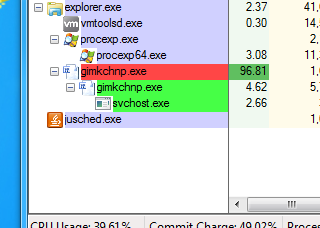
  • injects the asprox trojan into the new svchost process

Asprox initial injection caught in process explorer 


The asprox trojan that is injected into the svchost process is a dll. This dll can be extracted from the injected process for further analysis (see Incident Response and Remediation section of this report for further details). Once the asprox.dll is injected it takes over control of the program flow.

The asprox.dll actually has a small code stub that it uses to inject itself into the svchost.exe process so technically this is not the packer. Normally this stub would not be of much interest to us except for the way that gets the addresses for the library functions it uses. 

Since it is injected the asprox.dll gets the address of GetProcAddress by "walking" from the Process Environment Block down to the Module List and comparing the module names against a hash of "kernel32.dll" (the hash is 0x6A4ABC5B). This is where we see the first interesting IOC and gain some possible insight into the origins of asprox. The code used to perform this function matches similar code found in Zeus. It is possible that this section was copied from the leaked Zeus source or from a research blog post explaining how it works. Further explanation of this code can be found here

Asprox hash compare to find kernel32.dll module
As for our IOC we can now use a yara rule to search for the following bytes in memory (ex. with Volatility) 0x81 0xff 0x5b 0xbc 0x4a 0x6a which represents the assembly instruction cmp edi,0x6a4abc5b. This IOC by itself is not unique to asprox. 

Once the asprox.dll has been successfully injected into svchost.exe it kills its parent processes (the processes started by the packer) leaving an orphan svchost.exe process running under explorer.exe. This is our second IOC; an svchost.exe process running under explorer.exe. Again this IOC is common to many families of malware and not unique to asprox.

Asprox injected svchost.exe under explorer.exe 


The main loop for the asprox.dll is then called through the asprox.dll export "Work". This concludes the initial injection of the asprox.dll.


Persistence

When the Work function is first called it attempts to create a mutex with a hard coded string. If the mutex is already in use the dll knows that another copy of itself is running and it terminates its host process. Though the hardcoded mutex string does make a unique IOC it is frequently changed so it cannot be relied on as a generic asprox identifier.

Asprox test for mutex
Before entering the main loop of the Work function the asprox.dll checks the local user run key (HKEY_CURRENT_USER\Software\Microsoft\Windows\CurrentVersion\Run) to see if any key values have been set for its on-disk .exe file. 

If no run key is set then it attempts to hide its presence by copying its on-disk exe to a new file in the %LOCALAPPDATA% folder. The new file name is a randomly generated string of 8 lowercase letters. The original on-disk .exe file is then deleted. Here we have our next IOC, there will be an .exe in the %LOCALAPPDATA% folder with a random 8 letter lowercase name.

Asprox copied to %LOCALAPPDATA% folder
If there is a run key set then it will skip the file copy function and after 10 successful network communications with the c2 it will set a run key for the on-disk exe. The run key name is generated using 8 random lowercase letters. This provides us with another IOC.

Asprox run key using randomly generated 8 lowercase letters

Antivirus/Sandbox/Researcher Detection and Evasion

All versions of the asprox.dll collect the following information from its environment: firewall configuration, antivirus configuration, OS version, 32/64bit. This information is later reported back to the c2 in the <debug> element.

The firewall and antivirus configuration is collected using Microsoft's wbem service via the COM interface. The "ExecQuery" function is called on the wbem object so the input requires ascii strings which can be found in the process memory. These strings provide us with another IOC: "SELECT * FROM AntiVirusProduct" and "SELECT * FROM FirewallProduct" (these strings are unicode). This IOC does not indicate malicious behaviour by itself but combined with other IOCs from this report it can be used to identify asprox.

Example of asprox checking what antivirus products are installed on the host
Recent versions of the asprox.dll include examination of the environment in an attempt to determine if the asprox.dll is running in a sandbox or if a researcher is attempting to analyze it. The malware uses the FindWindow function to search for known analysis tools as well as enumerating various registry keys. This information is then passed to the c2 in <src> element. The window names and registry keys that are searched for are listed below (as of the latest version).

Window Names


wireshark.exe
Tfrmrpcap
iptools.exe
Iris-Version5.59
ProcessLasso_Notification_Class
TSystemExplorerTrayForm.UnicodeClass
PROCMON_WINDOW_CLASS
PROCEXPL
WdcWindow
ProcessHacker
99929D61-1338-48B1-9433-D42A1D94F0D2-x64
99929D61-1338-48B1-9433-D42A1D94F0D2-x32
99929D61-1338-48B1-9433-D42A1D94F0D2
Dumper
Dumper64
APISpy32Class
VMwareDragDetWndClass
VMwareSwitchUserControlClass
vmtoolsd.exe
prl_cc.exe
prl_tools.exe
SharedIntApp.exe
VBoxTray.exe
VBoxService.exe
vmusrvc.exe
vmsrvc.exe


Registry Keys


HKEY_LOCAL_MACHINE\SYSTEM\\CurrentControlSet\\services\\Disk\\Enum 0=VMware
HKEY_LOCAL_MACHINE\SYSTEM\\CurrentControlSet\\services\\Disk\\Enum 0=PTLTD
HKEY_LOCAL_MACHINE\SYSTEM\\CurrentControlSet\\services\\Disk\\Enum 0=Virtual
HKEY_LOCAL_MACHINE\HARDWARE\\DESCRIPTION\\System\\BIOS SystemProductName=VMware
HKEY_LOCAL_MACHINE\HARDWARE\\DESCRIPTION\\System\\BIOS SystemProductName=PTLTD
HKEY_LOCAL_MACHINE\HARDWARE\\DESCRIPTION\\System\\BIOS SystemManufacturer=VMware
HKEY_LOCAL_MACHINE\HARDWARE\\DESCRIPTION\\System\\BIOS SystemManufacturer=PTLTD
HKEY_LOCAL_MACHINESYSTEM\\CurrentControlSet\\Enum\\PCI\\VEN_15AD&DEV_0774&SUBSYS_040515AD&REV_00 
HKEY_LOCAL_MACHINESYSTEM\\CurrentControlSet\\Enum\\PCI\\VEN_15AD&DEV_0774&SUBSYS_074015AD&REV_00
HKEY_LOCAL_MACHINESYSTEM\\CurrentControlSet\\Enum\\PCI\\VEN_80EE&DEV_CAFE&SUBSYS_00000000&REV_00
HKEY_LOCAL_MACHINE\HARDWARE\\ACPI\\DSDT\\PTLTD__
HKEY_LOCAL_MACHINE\SYSTEM\\CurrentControlSet\\services\\Disk\\Enum 0=Virtual
HKEY_LOCAL_MACHINE\SYSTEM\\CurrentControlSet\\services\\Disk\\Enum 0=PRLS
HKEY_LOCAL_MACHINE\HARDWARE\\DESCRIPTION\\System\\BIOS SystemProductName=Virtual
HKEY_LOCAL_MACHINE\HARDWARE\\DESCRIPTION\\System\\BIOS SystemProductName=PRLS
HKEY_LOCAL_MACHINE\HARDWARE\\DESCRIPTION\\System\\BIOS SystemManufacturer=Virtual
HKEY_LOCAL_MACHINE\HARDWARE\\DESCRIPTION\\System\\BIOS SystemManufacturer=PRLS
HKEY_LOCAL_MACHINE\SYSTEM\\CurrentControlSet\\services\\Disk\\Enum  0= VBox
HKEY_LOCAL_MACHINE\HARDWARE\\DESCRIPTION\\System\\BIOS\ SystemProductName = VBox
HKEY_LOCAL_MACHINE\HARDWARE\\DESCRIPTION\\System\\BIOS\ SystemManufacturer=VBox
HKEY_LOCAL_MACHINE\HARDWARE\\ACPI\\DSDT\\VBOX__
HKEY_LOCAL_MACHINE\HARDWARE\\DESCRIPTION\\System\\BIOS\ SystemProductName = AMIBI
HKEY_LOCAL_MACHINE\HARDWARE\\DESCRIPTION\\System\\BIOS\ SystemManufacturer = AMIBI
HKEY_LOCAL_MACHINE, "SYSTEM\\CurrentControlSet\\Enum\\PCI\\VEN_5333&DEV_8811&SUBSYS_00000000&REV_00
HKEY_LOCAL_MACHINE, "SYSTEM\\CurrentControlSet\\Enum\\PCI\\VEN_80EE&DEV_BEEF&SUBSYS_00000000&REV_00
HKEY_LOCAL_MACHINE, "SYSTEM\\CurrentControlSet\\Enum\\PCI\\VEN_80EE&DEV_CAFE&SUBSYS_00000000&REV_00
HKEY_LOCAL_MACHINE, "HARDWARE\\ACPI\\DSDT\\AMIBI

The new versions of asprox.dll also added a 2min sleep to its initialization section which I suspect is an attempt at sandbox evasion. We can see when running the version with the sleep in the cuckoo sandbox that the 2min sleep is enough to evade much of the detection.

All of the checks happen in the "setup section" before the main loop in the asprox.dll so you can trick the window name searcher by not running any of your tools until after you see the asprox.dll make its first network call. You can also easily hide the registry keys or write a simple hook for RegQueryValueEx. Also if there is a run key that matches the image name of the process then the environment analysis is skipped. 


Incident Response and Remediation

Asprox is built to enable downloading and installation of a second-stage payload so it is very likely that the asprox.dll will be replaced by another piece of malware if an infected host is not attended to quickly. However, if a system is infected with the asprox.dll the following steps can be used to collect a sample of the .dll and clean the infected host.

Evidence Collection and Host Remediation 
  1. Verify the host is infected with asprox using the IOCs in this report. Note the PID of the svchost.exe process that is running under explorer.exe
  2. Use your favourite memory dump tool to dump the host memory and save to your analysis system
  3. Use process explorer to kill the svchost.exe process that is running under explorer.exe
  4. Open the %LOCALAPPDATA% folder and delete all instances of the asprox .exe (identified by the random 8 lowercase letter names)
  5. Open regedit and delete all run keys for the asprox.exe located in HKEY_CURRENT_USER\Software\Microsoft\Windows\CurrentVersion\Run
  6. Open regedit and delete all asprox registry keys in HKEY_CURRENT_USER\Software\ identified by the random 8 lowercase letter names (see more on how to positively identify these keys in the Communication:Group ID section of this report).

Evidence Analysis

  1. If you want to further analyze the asprox.dll that was injected into the scvhost process you can use volatility an run malfind on the svchost PID that you noted in the above steps.
  2. Once malfind has completed dumping the injected code you can easily locate the asprox dll in the segments by searching for the "MZ" header. The header will appear in multiple sections but only one of them has the full DLL (the one that has a sub of set-up code before the MZ). 
  3. Use your favourite hex editor to extract the dll. 
  4. Once you have extracted the dll it doesn't contain any anti-debugging/analysis features so you can easily analyze it.
  5. Post your analysis : )

Communication

Asprox communicates with its c2 using HTTP. Traditionally the requests where HTTP GET requests using RC4 encryption with a unique but static key. The Trend Micro report "Asprox Reborn" describes this communication in detail. However, the new versions of asprox use a much more complicated encryption scheme with HTTP POST requests. The new encryption scheme has been described here but this report will elaborate on the description. 

ID Generator

Each bot is assigned a unique ID that is both used to identify them to the c2. The ID is generated using the following algorithm
md5( binary_SID + os_install_date + account_name_string)

Note, when RegOpenKeyExA is called to access the os install date registry key the KEY_WOW64_64KEY flag is not passed on the samDesired argument. Since asprox.dll runs in a 32bit process the fact that it is missing this flag means that when it runs on a 64bit system it will access the wrong registry and the will get a null value. This means that os install date that is used as part of the ID hash will be 0x0000 for all 64bit systems. 
RegOpenKeyExA to get OS install date without the KEY_WOW64_64KEY flag set
In addition to identification a substring of the ID is also used for encryption. The first 4 bytes of the ID are used to create an ID_Key that is used to encrypt and decrypt locally stored values in registry keys as well as encrypt the URL for the c2 communication. 

I have included a small powershell script that will enable you to generate an asprox ID and ID_Key for any system. Note: the script will not work on domain joined systems as the NTAccount method would need to be adapted to get the domain SID.


$sUsername = [Environment]::UserName
$bUsername = [system.Text.Encoding]::UTF8.GetBytes($sUsername)


$objUser = New-Object System.Security.Principal.NTAccount($sUserName)
$strSID = $objUser.Translate([System.Security.Principal.SecurityIdentifier])
$bSid = New-Object 'byte[]' $strSID.BinaryLength
$strSID.GetBinaryForm($bSid,0)
    
if([IntPtr]::Size -eq 4){                        
    $key="hklm:\software\microsoft\windows nt\currentversion"
    $data = Get-ItemProperty -Path $key -Name "InstallDate"
    $bInstallDate = [System.BitConverter]::GetBytes($data.InstallDate)                       
}                        
Else{    
    #account for error in asprox wow64 reg key lookup                    
    $bInstallDate = [System.BitConverter]::GetBytes(0x0000)                        
}

$md5 = new-object -TypeName System.Security.Cryptography.MD5CryptoServiceProvider
$utf8 = new-object -TypeName System.Text.UTF8Encoding
$hash = [System.BitConverter]::ToString($md5.ComputeHash($bSid + $bInstallDate + $bUsername))
$Id = $hash -replace '-',''
$IdKey = $Id.Substring(0,8)

echo "ID: $Id"
echo "ID Key: $IdKey"

Group ID

In addition to a unique ID the bot is assigned a Group_ID. Though we can't be certain what the Group_ID is used for we can hypothesize that it is used to track groups of bots and make bot management easier. When asprox.dll runs if there is no run key set for it then it will assign the Group_ID based on hard coded string in the asprox.dll. 

If there is a run key set then it will enumerate all keys in HKEY_CURRENT_USER\Software and attempt to RC4 decrypt each key value using the ID_Key. It will then compare the decrypted key value against the string "For group!!!!!" if the string matches then it will take the remaining portion of the string (after the for group part) and use that as the Group_ID.

Asprox enumerating HKEY_CURRENT_USER\Software for "For Group!!!!!" key
This provides us with another IOC; a registry key in HKEY_CURRENT_USER\Software with a name composed of 8 random lowercase letters who's value can be decrypted by the host Key_ID to display the string "For group!!!!!<group_id>". This key is only set when asprox.dll has successfully communicated with the c2 10 times.

Example of asprox For Group!!!!! registry key 


IP Addresses

Asprox gets its IP addresses from one of two locations, either a registry key, or hard coded in the asprox.dll. Each time asprox.dll makes a new network request to the c2 it uses the same method described above in Group ID to enumerate all the keys under HKEY_CURRENT_USER\Software, decrypt their values, and compare them to the string "You Fag!!!!!". If the string compare matches then the part of the key after the you fag string is interpreted as an in_addr struct. This key is only set when asprox.dll receives new IP addresses from the c2.

If no registry key is found then the asprox.dll uses a hard coded ip address that is RC4 encrypted with a hardcoded key. The hardcoded key varies with each version of asprox. 


URL String

The URL path is hard coded in the asprox.dll as "/index.php?r=gate" but it is RC4 encrypted with the ID_Key and prepended with the ID_Key before being sent. The new versions of asprox use a POST instead of a GET so no interesting parameters are passed in this URL.

Request Body (XML)

The actual content sent by aprox.dll to the c2 is encapsulated in XML. There are two versions of the XML a slightly older version and a newer version. Both are described below.

Older Version


XMLExplanation
<knock>XML top element open
<id>%s</id>ID string
<group>%s</group> Group ID string
<time>%d</time> Negative timestamp
<version>%d</version> Hardcoded bot version
<status>%d</status>Status of last command
<debug>%s</debug>Environment information such as OS version, 64/32bit, firewall, antivirus
</knock>XML top element close


New Version


XMLExplanation
<knock>XML top element open.
<id>%s</id>ID string.
<group>%s</group> Group ID string.
<src>%d</src> Reports if any of the researcher tools or sandbox string are found.
<transport>%d</transport> Reports if asprox is running from a removable drive. This may hint at a possible worm version in the future.
<time>%d</time> Negative timestamp.
<version>%d</version> Hardcoded bot version.
<status>%d</status>Status of last command.
<debug>%s</debug>Environment information such as OS version, 64/32bit, firewall, antivirus.
</knock>XML top element close


Request Encryption

Once the XML body has been constructed it is bzip compressed and then RC4 encrypted with a dynamically generated key. They key is then RSA encrypted with the following public certificate:

-----BEGIN PUBLIC KEY-----
MIGfMA0GCSqGSIb3DQEBAQUAA4GNADCBiQKBgQDCUAUdLJ1rmxx+bAndp+Cz6+5I
Kmgap2hn2df/UiVglAvvg2US9qbk65ixqw3dGN/9O9B30q5RD+xtZ6gl4ChBquqw
jwxzGTVqJeexn5RHjtFR9lmJMYIwzoc/kMG8e6C/GaS2FCgY8oBpcESVyT2woV7U
00SNFZ88nyVv33z9+wIDAQAB
-----END PUBLIC KEY-----

The encrypted key and body are then sent as part of the POST request body. The format of the POST request varies between the slightly older version and the newer version of the bot. Both formats are described below.

Older Version

The older version uses multipart/form-data as the content-type and separates the key and body into two separate streams name="key" filename="key.bin" and name="data" filename="data.bin".

Example of older style asprox encrypted request

New Version

The new version uses application/x-www-form-urlencoded as the content-type and does not have any ascii strings in the body. This eliminates any network IOCs that we might have used from the older version.

Example of new style asprox encrypted c2 request

If we take a closer look at the data that is being sent in the body we can decipher how the key and body are combined. The first 4 bytes of the body represent the length of the encrypted key (little endian) 0x00000080. This is followed by the encrypted key. The encrypted key is followed by another 4 bytes that represent the length of the encrypted body 0x000000b6. These 4 bytes are then followed by the encrypted body.

A closer look at the new style of asprox encrypted c2 request

Response Decryption

The response that is received from the c2 follows the same pattern as described above but instead of a key and body the c2 sends a RSA signed hash of the response data and the actual response data bzip compressed and RC4 encrypted with the key that was sent with the request. 

Examining the response we can see the first 4 bytes of the response body represent the length of the RSA signed hash of the data (little endian) 0x00000080. This is followed by the RSA signed hash. The RSA signed hash is followed by another 4 bytes that represent the length of the RC4 encrypted data 0x00000069. These 4 bytes are then followed by the RC4 encrypted data.

A close look at asprox c2 encrypted response 

Commands and Capabilities

The commands have not changed since the release of the Trend Micro report however their encoding has. The commands are now send in XML encapsulation and are parsed by the MSXML 3.0 COM service. An example of a command XML is displayed below.

<knock>
<id>P35E71L7CK3DF19AD5D138677W6C734T</id>
<task type="idl" />
</knock>

The following commands are available to the asprox c2 server.


CommandExplanation
idlLong sleep, no commands.
rdlDownload and run asprox module.
runDownload .exe, install and run it.
remUninstall. This command removes the asprox .exe, run key, and You Fag!!!!! key but it doesn't remove the For Group!!!!! key. This can be used as a potential IOC to prove asprox was installed if it removes itself.
redUpdate registry keys.
updUpdate asprox .exe

Samples and IOCs

Memory only IOC can be found in IOC Bucket. This IOC is tailored to only match on the memory strings that will be most difficult for the malware authors to modify.

Disk IOC can be found on pastebin here. The IOC uses OpenIOCv1.1 as it requires regular expressions for file paths and registry keys. It will be posted it IOC Bucket as soon as OpenIOC 1.1 is supported (note* most tools do not yet support OpenIOCv1.1).

Samples

The older new version of asprox and the extracted dll can be found here while the new version of asprox and the extracted dll can be found here.

The cuckoo sandbox report for the older new version of asprox can be found here while the cuckoo sandbox report for the new version of asprox can be found here.

I will make all my IDA analysis .idb files available to researchers who are interested in verifying my work or collaborating. Please contact me @herrcore (I will only share with folks who I know or who can be verified by someone I know).

Next Steps

If you are interested in collaborating on a research project please contact me @herrcore. I have a few ideas of where to take this but I'll need some help.

I will also be posting a smaller report detailing how asprox has evolved over the past five months. My intent is to provide some insight into how the asprox developers work and what direction the botnet might be heading in.

Final Note

The developers of Asprox have been shown to be very reactive to reports that are generated by researchers; one week after posting about the hard-coded multipart boundary string in their POST requests they updated the bot and removed the string from their POST requests. I expect that this report will cause them to change the communication and encryption of the bot but any changes will be quick to reverse given the information that is provided in this report.